
Other tasks
Table of Contents
Metrics
Object detection
Segmentation
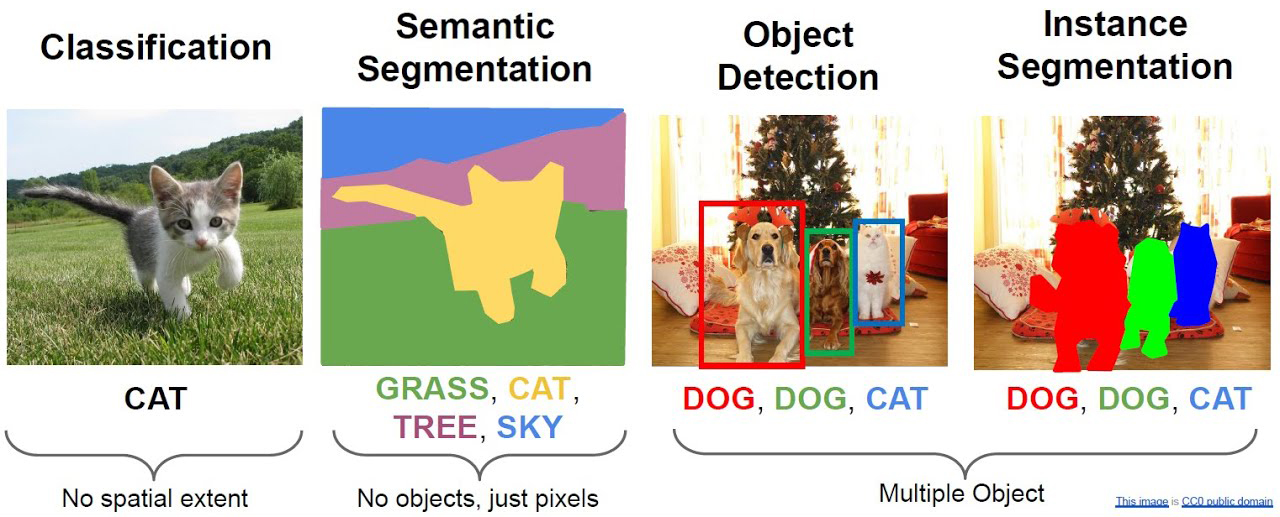
While image classification assigns a single label to an entire image, there are many other important computer vision tasks that go beyond simply identifying what an image contains:
Object Detection
Object detection identifies multiple objects within an image and locates them by drawing bounding boxes around each object. Each box is labeled with the detected class and often includes a confidence score. This is essential for applications like:
Autonomous driving (detecting pedestrians, vehicles, traffic signs)
Security systems (detecting people, suspicious objects)
Retail analytics (counting products on shelves)
Image Segmentation
Image segmentation assigns a class label to every pixel in an image, creating a detailed pixel-level mask. Unlike detection which uses bounding boxes, segmentation provides precise object boundaries. Two main approaches:
Semantic Segmentation: All pixels of the same class have the same label (e.g., all dogs are one color)
Instance Segmentation: Different instances of the same class have different labels (e.g., each dog separately)
Segmentation is used in:
Medical imaging (identifying tumors, organs)
Satellite imagery (land use classification)
Autonomous vehicles (road/obstacle/lane detection)
In this notebook, we’ll explore techniques and models for both detection and segmentation tasks.
Evaluation Metrics
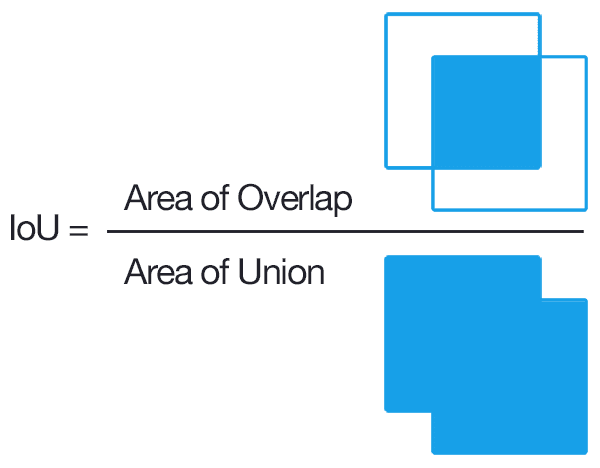
The measures used until know are not working for these kind of tasks. Therefore, we need a measure for these scenarios. The main evluation metric for object detection and segmentation is Intersection over Union (IoU). Measures the overlap between predicted and ground truth bounding boxes. A detection is considered correct if IoU is greater than a threshold (commonly 0.5).
Definition:
Where:
Intersection (I): The overlapping area between the predicted box and the ground truth box
Union (U): The total area covered by both boxes (without double-counting the intersection)
IoU Range:
IoU = 0: No overlap - completely missed prediction
IoU = 1: Perfect match - predicted box exactly matches ground truth
IoU ∈ [0, 1]: Partial overlap - the closer to 1, the better the prediction
Practical Thresholds:
IoU > 0.5: Often used as the minimum threshold to consider a detection as «correct»
IoU > 0.75: Stricter threshold for high-quality detections
IoU > 0.9: Very stringent threshold for near-perfect predictions
Why IoU is Important:
Localization Accuracy: Unlike classification (which only cares about the class), IoU evaluates how precisely the model localized the object
Threshold Flexibility: Different applications require different IoU thresholds (autonomous driving needs higher precision than web image tagging)
Dataset Independence: The metric doesn’t depend on dataset-specific properties; it’s universally applicable
Object detection
YOLO (You Only Look Once) is a real-time object detection framework that revolutionized how computers detect objects in images and videos. Instead of scanning multiple regions, YOLO predicts bounding boxes and class probabilities in a single forward pass, making it extremely efficient.
Ultralytics is the official organization maintaining and developing YOLO. They provide the ultralytics Python library, which offers:
State-of-the-art Models: YOLOv8, YOLOv9, YOLOn, and other versions optimized for different use cases
Multiple Tasks:
Object detection
Instance segmentation
Pose estimation
Multi-object tracking
Classification
Key Advantages of Ultralytics YOLO:
Speed: Real-time inference on CPUs, GPUs, and mobile devices
Accuracy: Competitive mAP scores on standard benchmarks (COCO, Pascal VOC)
Ease of Use: Simple API for training, inference, and evaluation
Pre-trained Weights: Models come pre-trained on COCO (80 classes) or other datasets
Transfer Learning: Easy fine-tuning on custom datasets
Deployment: Supports export to various formats (ONNX, TensorRT, CoreML, etc.)
YOLO Workflow:
Load a Pre-trained Model: Automatically downloads weights from HuggingFace
Predict on Images/Videos: Apply detection in one line of code
Fine-tune on Custom Data: Train with custom labeled datasets
Deploy: Export to production-ready formats
This makes YOLO ideal for practical computer vision applications, from autonomous driving to real-time video analysis.
First we need to install the library:
[2]:
!pip install ultralytics
Requirement already satisfied: ultralytics in /Users/miquelmn/miniconda3/lib/python3.13/site-packages (8.4.48)
Requirement already satisfied: numpy>=1.23.0 in /Users/miquelmn/miniconda3/lib/python3.13/site-packages (from ultralytics) (2.3.3)
Requirement already satisfied: matplotlib>=3.3.0 in /Users/miquelmn/miniconda3/lib/python3.13/site-packages (from ultralytics) (3.10.7)
Requirement already satisfied: opencv-python>=4.6.0 in /Users/miquelmn/miniconda3/lib/python3.13/site-packages (from ultralytics) (4.13.0.92)
Requirement already satisfied: pillow>=7.1.2 in /Users/miquelmn/miniconda3/lib/python3.13/site-packages (from ultralytics) (11.3.0)
Requirement already satisfied: pyyaml>=5.3.1 in /Users/miquelmn/miniconda3/lib/python3.13/site-packages (from ultralytics) (6.0.3)
Requirement already satisfied: requests>=2.23.0 in /Users/miquelmn/miniconda3/lib/python3.13/site-packages (from ultralytics) (2.32.4)
Requirement already satisfied: scipy>=1.4.1 in /Users/miquelmn/miniconda3/lib/python3.13/site-packages (from ultralytics) (1.16.3)
Requirement already satisfied: torch>=1.8.0 in /Users/miquelmn/miniconda3/lib/python3.13/site-packages (from ultralytics) (2.8.0)
Requirement already satisfied: torchvision>=0.9.0 in /Users/miquelmn/miniconda3/lib/python3.13/site-packages (from ultralytics) (0.23.0)
Requirement already satisfied: psutil>=5.8.0 in /Users/miquelmn/miniconda3/lib/python3.13/site-packages (from ultralytics) (7.1.1)
Requirement already satisfied: polars>=0.20.0 in /Users/miquelmn/miniconda3/lib/python3.13/site-packages (from ultralytics) (1.40.1)
Requirement already satisfied: ultralytics-thop>=2.0.18 in /Users/miquelmn/miniconda3/lib/python3.13/site-packages (from ultralytics) (2.0.19)
Requirement already satisfied: contourpy>=1.0.1 in /Users/miquelmn/miniconda3/lib/python3.13/site-packages (from matplotlib>=3.3.0->ultralytics) (1.3.3)
Requirement already satisfied: cycler>=0.10 in /Users/miquelmn/miniconda3/lib/python3.13/site-packages (from matplotlib>=3.3.0->ultralytics) (0.12.1)
Requirement already satisfied: fonttools>=4.22.0 in /Users/miquelmn/miniconda3/lib/python3.13/site-packages (from matplotlib>=3.3.0->ultralytics) (4.60.1)
Requirement already satisfied: kiwisolver>=1.3.1 in /Users/miquelmn/miniconda3/lib/python3.13/site-packages (from matplotlib>=3.3.0->ultralytics) (1.4.9)
Requirement already satisfied: packaging>=20.0 in /Users/miquelmn/miniconda3/lib/python3.13/site-packages (from matplotlib>=3.3.0->ultralytics) (25.0)
Requirement already satisfied: pyparsing>=3 in /Users/miquelmn/miniconda3/lib/python3.13/site-packages (from matplotlib>=3.3.0->ultralytics) (3.2.5)
Requirement already satisfied: python-dateutil>=2.7 in /Users/miquelmn/miniconda3/lib/python3.13/site-packages (from matplotlib>=3.3.0->ultralytics) (2.9.0.post0)
Requirement already satisfied: polars-runtime-32==1.40.1 in /Users/miquelmn/miniconda3/lib/python3.13/site-packages (from polars>=0.20.0->ultralytics) (1.40.1)
Requirement already satisfied: six>=1.5 in /Users/miquelmn/miniconda3/lib/python3.13/site-packages (from python-dateutil>=2.7->matplotlib>=3.3.0->ultralytics) (1.17.0)
Requirement already satisfied: charset_normalizer<4,>=2 in /Users/miquelmn/miniconda3/lib/python3.13/site-packages (from requests>=2.23.0->ultralytics) (3.3.2)
Requirement already satisfied: idna<4,>=2.5 in /Users/miquelmn/miniconda3/lib/python3.13/site-packages (from requests>=2.23.0->ultralytics) (3.7)
Requirement already satisfied: urllib3<3,>=1.21.1 in /Users/miquelmn/miniconda3/lib/python3.13/site-packages (from requests>=2.23.0->ultralytics) (2.5.0)
Requirement already satisfied: certifi>=2017.4.17 in /Users/miquelmn/miniconda3/lib/python3.13/site-packages (from requests>=2.23.0->ultralytics) (2025.11.12)
Requirement already satisfied: filelock in /Users/miquelmn/miniconda3/lib/python3.13/site-packages (from torch>=1.8.0->ultralytics) (3.19.1)
Requirement already satisfied: typing-extensions>=4.10.0 in /Users/miquelmn/miniconda3/lib/python3.13/site-packages (from torch>=1.8.0->ultralytics) (4.12.2)
Requirement already satisfied: setuptools in /Users/miquelmn/miniconda3/lib/python3.13/site-packages (from torch>=1.8.0->ultralytics) (78.1.1)
Requirement already satisfied: sympy>=1.13.3 in /Users/miquelmn/miniconda3/lib/python3.13/site-packages (from torch>=1.8.0->ultralytics) (1.14.0)
Requirement already satisfied: networkx in /Users/miquelmn/miniconda3/lib/python3.13/site-packages (from torch>=1.8.0->ultralytics) (3.5)
Requirement already satisfied: jinja2 in /Users/miquelmn/miniconda3/lib/python3.13/site-packages (from torch>=1.8.0->ultralytics) (3.1.6)
Requirement already satisfied: fsspec in /Users/miquelmn/miniconda3/lib/python3.13/site-packages (from torch>=1.8.0->ultralytics) (2025.9.0)
Requirement already satisfied: mpmath<1.4,>=1.1.0 in /Users/miquelmn/miniconda3/lib/python3.13/site-packages (from sympy>=1.13.3->torch>=1.8.0->ultralytics) (1.3.0)
Requirement already satisfied: MarkupSafe>=2.0 in /Users/miquelmn/miniconda3/lib/python3.13/site-packages (from jinja2->torch>=1.8.0->ultralytics) (3.0.2)
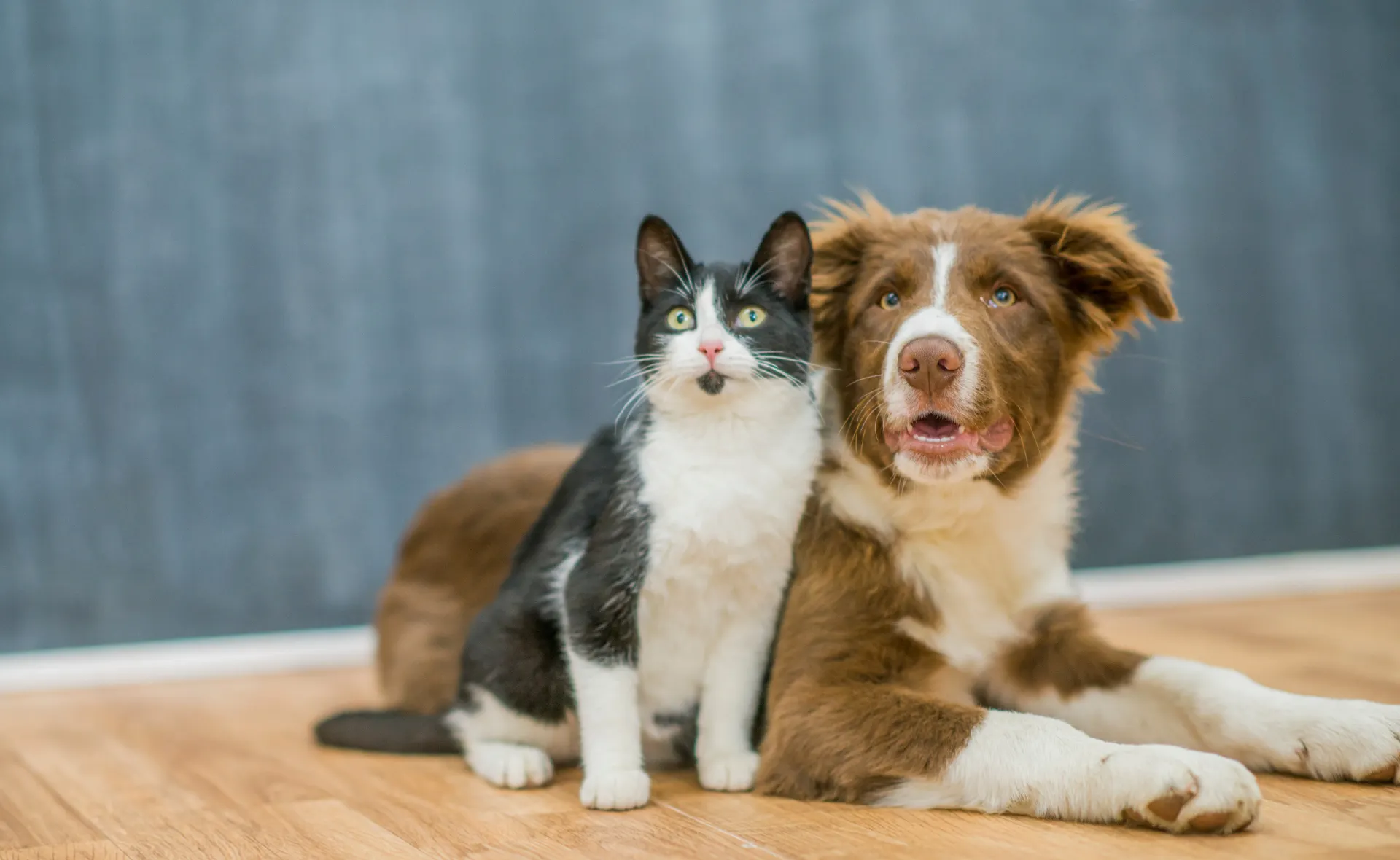
Ultralythic allow us to load images with many different ways. The most straightforward approach is the to first load the image, and then make the prediction.
[3]:
from PIL import Image

img = Image.open('./data/example.jpg')
img
[3]:
[4]:
from ultralytics import YOLO

# Load a pre-trained YOLOv8 model (automatically downloads weights)
# Available sizes: nano (n), small (s), medium (m), large (l), extra-large (x)
model = YOLO('yolov8m.pt')  # Medium model, good balance between speed and accuracy

# Predict on an image
#results = model.predict(source='./data/example.jpg', conf=0.5)
results = model.predict(source=img, conf=0.5)

# Access detection results
for result in results:
    boxes = result.boxes  # Bounding boxes
    print(f"Detections: {len(boxes)}")

    for box in boxes:
        # Get coordinates and confidence
        x1, y1, x2, y2 = box.xyxy[0]
        conf = box.conf[0]
        cls = box.cls[0]
        print(f"Class: {cls}, Confidence: {conf:.2f}, Box: ({x1}, {y1}, {x2}, {y2})")
0: 416x640 1 cat, 1 dog, 92.9ms
Speed: 4.0ms preprocess, 92.9ms inference, 4.7ms postprocess per image at shape (1, 3, 416, 640)
Detections: 2
Class: 15.0, Confidence: 0.94, Box: (425.8559265136719, 287.2218017578125, 1129.8370361328125, 1115.449951171875)
Class: 16.0, Confidence: 0.94, Box: (1030.36279296875, 257.534912109375, 1918.24560546875, 1147.1893310546875)
[5]:
result.show() # display to screen
Segmentation
Image Segmentation is a computer vision task that assigns a class label to every pixel in an image, creating a detailed pixel-level mask. Unlike object detection which provides bounding boxes, segmentation delivers precise object boundaries and is essential for applications requiring precise localization.
Two Main Types of Segmentation:
Semantic Segmentation: Assigns the same label to all pixels of the same class
Example: All pixels belonging to dogs get one label, all cars get another
Doesn’t distinguish between different instances of the same class
Use cases: Medical imaging, satellite imagery, autonomous driving
Instance Segmentation: Assigns different labels to different instances of the same class
Example: Each dog in the image gets its own unique label
Combines the strengths of object detection and semantic segmentation
Use cases: Counting individual objects, tracking multiple instances
Advantages of Segmentation over Detection:
Precise Boundaries: Pixel-level accuracy instead of bounding boxes
Better Localization: Exact shape and size of objects
Context Understanding: Useful for scene understanding and analysis
YOLO for Segmentation:
The ultralytics YOLO framework supports instance segmentation out of the box. The workflow is similar to object detection, but the output includes:
Bounding boxes (same as detection)
Confidence scores
Segmentation masks (polygon points or binary masks for each detected object)
This allows you to get both detection and precise segmentation in a single pass, making it ideal for real-world applications that require both speed and accuracy.
Instance Segmentation with YOLO
To perform instance segmentation, we use a YOLO segmentation model (note the difference from detection models). The model automatically detects objects and provides segmentation masks for each instance:
[7]:
# Load a pre-trained YOLOv8 segmentation model
# Note: Using 'seg' in the model name loads a segmentation-capable model
model_seg = YOLO('yolov8m-seg.pt')  # Segmentation model

# Perform instance segmentation
seg_results = model_seg.predict(source=seg_img, conf=0.5)

# Access segmentation results
for result in seg_results:
    masks = result.masks  # Segmentation masks
    boxes = result.boxes  # Bounding boxes

    print(f"Total instances detected: {len(boxes)}")

    if masks is not None:
        print(f"Segmentation masks shape: {masks.shape}")
        print(f"Mask data type: {masks.data.dtype}")

        for i, box in enumerate(boxes):
            # Get detection info
            x1, y1, x2, y2 = box.xyxy[0]
            conf = box.conf[0]
            cls = box.cls[0]

            # Get segmentation mask
            mask = masks.data[i]  # Binary mask for this instance
            pixels_in_mask = mask.sum().item()

            print(f"\nInstance {i}:")
            print(f"  Class: {int(cls)}, Confidence: {conf:.2f}")
            print(f"  Box: ({x1:.0f}, {y1:.0f}, {x2:.0f}, {y2:.0f})")
            print(f"  Mask pixels: {pixels_in_mask:.0f}")
Downloading https://github.com/ultralytics/assets/releases/download/v8.4.0/yolov8m-seg.pt to 'yolov8m-seg.pt': 100% ━━━━━━━━━━━━ 52.4MB 4.6MB/s 11.5s11.4s<0.1s3s

0: 416x640 1 cat, 1 dog, 115.2ms
Speed: 1.3ms preprocess, 115.2ms inference, 2.6ms postprocess per image at shape (1, 3, 416, 640)
Total instances detected: 2
Segmentation masks shape: torch.Size([2, 416, 640])
Mask data type: torch.uint8

Instance 0:
  Class: 16, Confidence: 0.88
  Box: (1029, 256, 1917, 1144)
  Mask pixels: 47706

Instance 1:
  Class: 15, Confidence: 0.71
  Box: (576, 288, 1129, 1116)
  Mask pixels: 31239
[8]:
seg_result = seg_results[0]
seg_result.show()  # Display segmentation results with masks overlaid
Exercice
Load an image and do an object detection and segmentation with ultralytics.
How would you obtain the IOU for both tasks?